
IXD 103 UX & UI design Mobile prototype
CoSpace
A shared space for independent work.
A mobile coworking concept that brings nearby meetups, virtual rooms, and shared focus sessions into one place. Designed for remote workers and students who want company without losing their rhythm.
Work independently. Feel connected.
Find your focus.
Find your people.
01 / Overview
Making room for connection
in an independent workday.
For this team project, I worked on a mobile concept for people whose work or study primarily happens online. Our starting point was a simple question: how could a digital product bring more structure and social connection into a day spent working independently?
CoSpace explores two ways to work alongside others: joining a local coworking meetup or entering a virtual room. Shared focus blocks, scheduled breaks, and session details give both experiences a common structure.
Find company
Discover nearby sessions or join a virtual room that fits the way you want to work.
Set expectations
See the location, timing, session type, and group details before joining.
Share a rhythm
Make space for focused work and social breaks within the same session.
This is an academic concept and Figma prototype. Connection, motivation, and routine were design goals, rather than measured outcomes.
02 / The experience
Two ways to show up.
One place to get started.
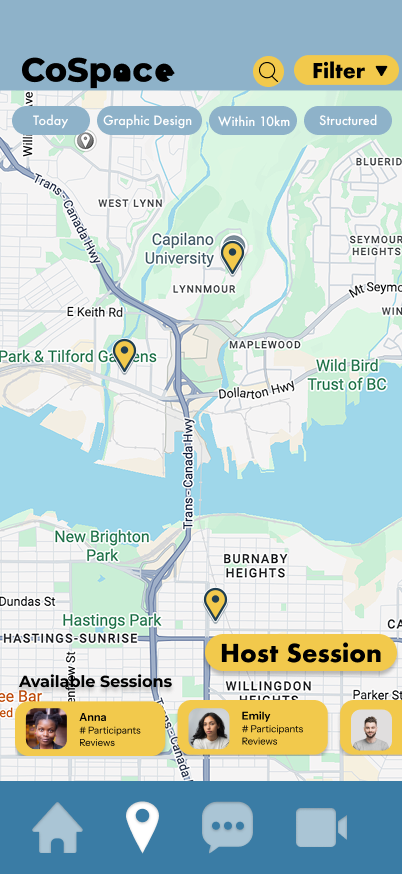
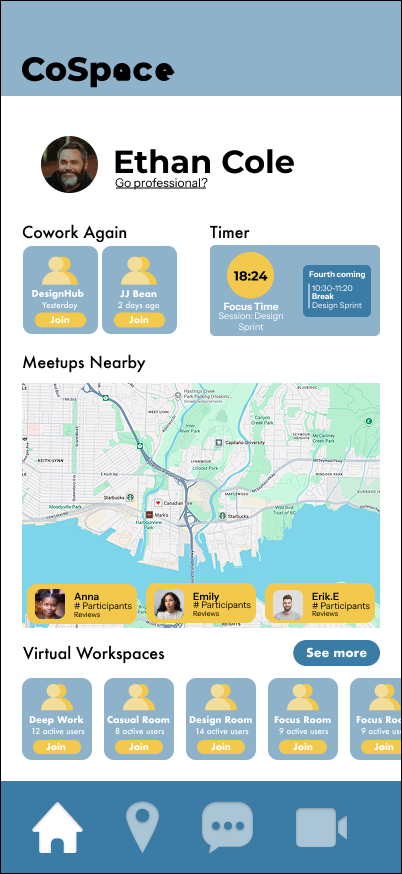
The home screen brings recent sessions, nearby meetups, and virtual workspaces together. A map gives local sessions a physical context, while virtual room cards offer another way to join from wherever you are.
Find a place
to work together.
Browse sessions around North Vancouver and review the context before joining.
Bring a little company
to your focus time.
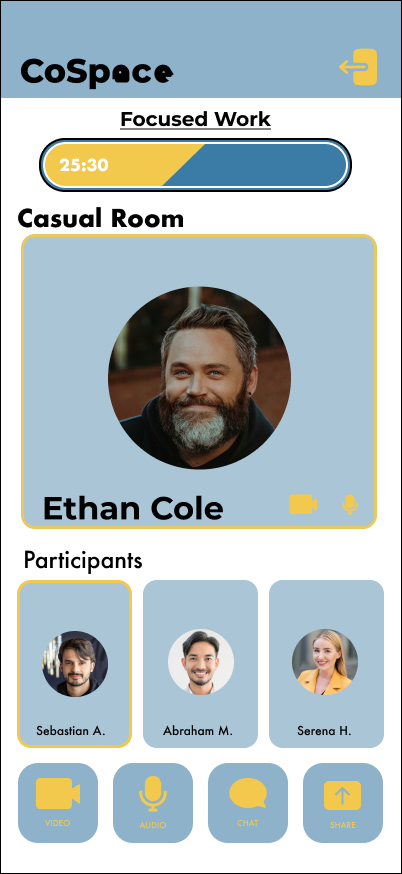
A shared timer and visible participants keep the room centred on working alongside others.
03 / Hosting a session
Make the plan clear
before people arrive.
Hosting asks someone to make several decisions. The flow separates location, session details, and scheduling, then gathers them into an editable summary before publishing.
Select a step to inspect the hosting screen.
01 / 04
A selected pin and address field make the proposed meeting place explicit before moving on.
04 / From flow to interface
Designing the whole session,
one transition at a time.
The original wireflow maps what happens around the work itself: getting directions, arriving, focusing, taking a break, and finishing. Showing these transitions makes the concept easier to assess than presenting a collection of individual screens.
The high fidelity prototype uses that structure across session setup, participant views, timers, and communication controls.
05 / Visual system
A practical structure
with a warmer personality.
CoSpace pairs blue surfaces with yellow actions and highlights. Rounded controls and the expressive wordmark give the concept a social character, while repeated navigation and layout patterns connect the different session types.
Original typefaces
Futura
Montserrat
Display personality and clear supporting information.
View the Figma design guideA closer look
The details of working together.
Select a screen to inspect the interface.
06 / Reflection
A connection concept
built around the workday.
CoSpace brings local discovery, virtual presence, and focus routines into a single mobile concept. The strongest part of the direction is the relationship between those pieces: finding people is only the beginning; knowing what to expect helps define the shared experience.
What I would validate next
I would test whether people can choose an appropriate session, understand its expectations, and complete the hosting flow without guidance. I would also review small text, colour contrast, and the meaning of the navigation icons before taking the interface further.